
Microsoft Dynamics 365
Built into Business Central
The UK postcode lookup provider selected by Microsoft for Dynamics 365 Business Central
 No setup
 ISO-27001
 GDPR compliant
 Royal Mail PAF
Accurate addresses, everywhere in BC
Royal Mail PAF
Verified UK addresses sourced from the most complete and authoritative UK address dataset available.
Rooftop Accuracy
Every UK address includes a rooftop-level geocode and UPRN: precision most providers don't include at all.
GB, IE, NL, SG
Supports UK, Ireland, Netherlands and Singapore so international entities are covered alongside UK records.
Fewer Data Errors
Catch bad addresses before they cause failed deliveries, returned mail, or billing disputes downstream.
Native to Business Central
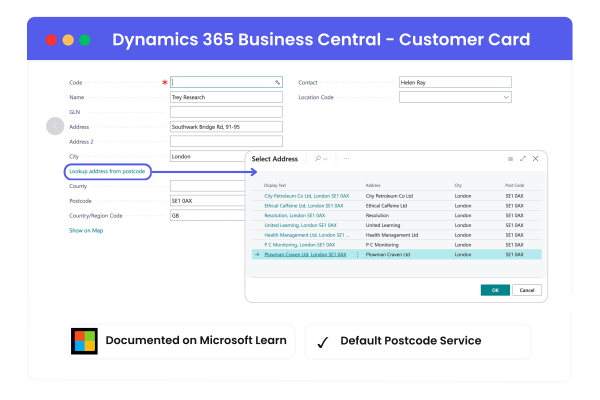
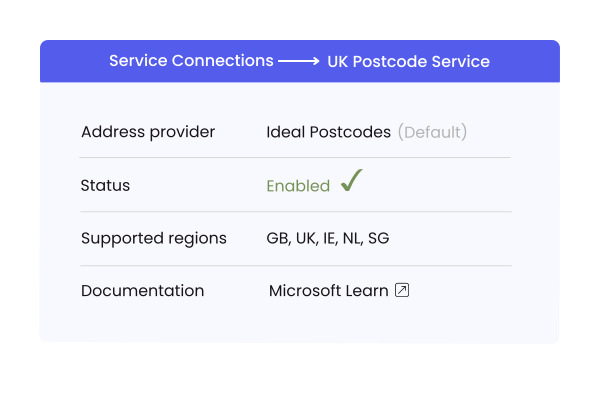
Ideal Postcodes is the default postcode lookup provider in the UK version of Dynamics 365 Business Central, documented on Microsoft Learn. That means no AppSource hunting, no extra extension to install, and no maintenance overhead.
- Already in the BC activation flow; enabled in Service Connections
- No separate AppSource installation required
- Built into BC and maintained alongside Microsoft releases
- Documented on Microsoft Learn
Get started in 3 simple steps
1. Enable in Service Connections
In Business Central, go to Service Connections → UK Postcode Service → select Ideal Postcodes as your provider. No coding required.
2. Get your API key
Create a free account, choose a plan based on your lookup volume, and paste your API key directly into the BC setup page.
3. Start validating addresses
Enter a postcode on any card - customer, vendor, contact, employee, bank account - and select from a verified address list.
Implementing Business Central for clients?
If you manage multiple BC tenants, Ideal Postcodes gives you a consistent, low-maintenance postcode lookup solution across your whole portfolio. It's already in the activation flow, no per-client AppSource work required. Partners also earn a reseller margin on every lookup, with the option to package address data quality as a paid add-on for clients.
Less implementation effort
Already in the activation flow. No AppSource hunting or per-client extension setup on new deployments
Fewer support tickets
Fewer address errors post-go-live mean fewer client calls, less rework, and cleaner data from day one
Reseller opportunity
Package address data quality as a paid add-on for clients. Our partner programme includes a reseller margin on lookups and support